Thursday, November 10, 2011

I Appreciate What GSI Did For Me

This is something that happened a little while ago, and I've been meaning to tell you about it. Here goes.

You know I really enjoy coffee. All kinds. I've had French Press coffee before, but didn't have a press to do it myself.

We were at Mast General Store and in their camping section I found Lexan presses by GSI Outdoors. I liked the idea of a shatter-resistant carafe, instead of glass (I've gone through numerous glass espresso carafes). So I bought the press. Works great, good coffee.

Not long after I bought it, I broke the lid. Sigh. I wrote the company, asking whether I could buy a new lid. They wrote back, and said all I had to do was call them, and they'd send me a new lid. So I did, and they did too.

Thanks GSI! I appreciate it.

Wednesday, November 9, 2011

Fighting Expedia, Chapter 2

Well I wish I had something better to report. Right after I posted the last installment, I got a Twitter message from @Expedia, saying "sorry to hear you're having problems, please give us a call." I spoke again with Corey, and he again apologized, asked me to be patient, blamed various system failures, etc. I told him I'd wait to see what shakes out from BBB.

On October 8, two weeks after I filed the complaint from BBB, I got a response from Expedia through BBB, the essence of which was, sorry for the trouble, please be patient, it's not our fault, etc. I was particularly irritated by Expedia's statement: "If the card has not been received within the next two weeks then we may visit other options for this customer but we must have proof that the customer has not received the promotional item at that time."

BBB asked whether I was satisfied with their response and wanted to close the case (Seriously?) I said "No," because Expedia hadn't actually done anything. I think the case should be closed when they do what they had promised.

On October 18, I got an email from Expedia saying that the card was on its way!

Perhaps it's a good idea that I didn't hold my breath, because as of yesterday, November 8, the card hasn't arrived.

On November 1 I checked the status of the case and saw I had gotten a response (tagged "FINAL RESPONSE FROM BUSINESS") to my rejecting their earlier response (from October 8). It said they were sorry that I declined their earlier response, and they said the gift card was "resubmitted" on October 17. And because they're sorry for the inconvenience, they were giving me a $50 coupon to be used for future travel booked through Expedia. All I'd have to do is create an account with them (I used a guest account for the July trip), then call one of their reps with my case number to apply the coupon to my account.

Right.

BBB asked whether I was satisfied, and I replied "No," saying that all I want is the gift card, the coupon is worthless, and considering all the grief this has been ("your trip doesn't qualify," "you didn't click the [non-existent] link," "we're closed," on hold until disconnected, etc) I just would rather not do business with them at all. There are plenty of other ways to book travel.

The moment the card arrives, I'd be happy to consider the case resolved.

Imagine my surprise when I later log in to BBB to view the case, and find its status is "Closed."

11/01/2011 JAF BBB BBB judged complaint addressed
11/01/2011 Otto BBB Inform Consumer - Case Closed AJR
11/01/2011 Otto BBB Inform Business - Case Closed AJR
11/01/2011 Otto BBB Case Closed AJR

So I sent BBB a note asking "what gives?" I would have expected that the case would stay open until the case was actually resolved ie, that Expedia had done what they said they would do). BBB replied saying that they don't just hold cases open, but they said I could open another case if the card doesn't come. Thanks, BBB.

So after a month or so of trying to go the BBB route, BBB has not been a whole lot of help resolving the issue, and the card hasn't arrived.

Thursday, September 29, 2011

Fighting Expedia

Retailers often entice customers into a purchasing decision by offering a rebate, bonus, or other type of promotion. The retailer expects, however, that a portion of their customers will not follow through on claiming the rebate. There's even a term for it: "breakage."

Back in July my wife and I made a reservation through Expedia for a stay in St Petersburg, Florida. We had a great time, no problem there. When we made the reservation, however, Expedia had an offer for a $50 Gas Card on completion of the stay. We thought, "That's nice, it'll help cover the cost of the gas to get there."


When we got back home, we went to the Expedia site to find out how to claim the $50 gas card. Their emailed response to our inquiry told us to follow a link, which actually did not exist. So when I called their customer support line, I was informed that our trip did not qualify for the $50 gift card. I pointed out that it did, and the rep forwarded me up the chain. That next rep dropped my call. I was sitting at the computer while on hold, and I posted a tweet: something like "I'm having a hard time solving a problem with @expedia" (I had later deleted the post). Very soon after that I got a message inviting me to call them, and they actually gave my wife a phone call about the issue. I called Expedia back and spoke at length with one of their reps, who apologized profusely and blamed various system failures, and promised that we'd receive the gas card within the next week or two (the itinerary status screen said the estimated delivery was 8/26). About this time (August 2) I made a post saying that I was happy with how Expedia was helping to solve the problem, and deleted the earlier post about the original issue. (I've not deleted the happy post: it's shown below.)


Fast forward to today, about a month past the delivery date. There's no sign of the gas card. I called Expedia, trying to contact the same rep I had spoken with two months prior, but instead the operator sent me to their "Tier 3 Service Department". After a few minutes on hold, a message on an answering machine informed me that their offices were closed (it was 3PM Eastern), and told me to leave a message. So I did. I gave them my name, itinerary number, and phone number.

It started to seem to me that they were not going to fulfill the offer, and there was nothing I could do about it.

Except complain. And I generally don't like complaining.

First stop: Google. A search for "expedia gas card problem" will show you a lot of people have similar issues.

Next stop, the Better Business Bureau. I was very surprised to find the BBB gives them an A+ rating. Wow. How'd they manage that? Anyway I filed a complaint, and I got a message back from BBB saying they've forwarded the issue to Expedia. I should hear something by middle of next month.

One of the things the BBB complaint asked for was what did I want Expedia to do. My response was basically, just honor the gas card like they said they would. But I still hate all the aggravation they have caused. What should they do to make that right?

Takeaways:
1. Try not to let the promise of a Free __________ unduly influence a purchase decision. Have you ever noticed how tough it can be to claim a rebate? To use those frequent flier miles?
2. Try to be reasonable; try to be patient.
3. Don't be afraid to involve the BBB, especially dealing with a BBB accredited business.
4. You have more influence than you think you do.

Tuesday, June 7, 2011

Let's Reduce Teen Unemployment

Unemployment among teens is 24%.

Let's reduce teen unemployment. Here are a couple of thought experiments, and then a suggestion.

1. Pretend you are holding a garage sale this Saturday. You've got a lot of stuff to get rid of, and so you decide to make things simple on your neighbors, you will price each individual item at $10. At the end of the sale, you might have $20-$30, and a ton of your unsold stuff.

2. Pretend that all the gas stations in your state decide to sell gasoline at $10 per gallon. What will happen is that everybody is going to complain, some people will drive across the border to get to cheaper gas, some people won't drive at all, and a few desperate souls will endure the new expense. The gas stations, though, will find they aren't selling much gas anymore.

Price floors create surplus.

A minimum wage law is a price floor for workers. A minimum wage law is going to create surplus workers, that is, unemployment.

What if the minimum wage law were only to apply to workers over 21 years old? What if an employer were free to pay a teenaged worker a minimum of say 75% of minimum wage? (I'm suggesting a minimum, not a maximum wage.) What would happen to teen unemployment? My guess is teen unemployment would drop like a rock.

Monday, May 30, 2011

iPhone Development: Accessing SOAP Services with WSDL2ObjC Part III

Has it been that long? My how time flies. Last time I wrote about WSDL2ObjC, we built a program which used a SOAP service to return us a barcode image. This time we're going to look at asynchronous calls, and we're going to build a small app which tells us what the current weather conditions are for a particular ZIP code.

Asynchronous calls are nice because we don't have to wait for them to complete. We issue the call, and then continue with whatever task we were performing. If we make a call from the same code that handles our user interface, our UI does not hang while we are waiting for completion of the call. I'm going to start this tutorial from scratch; I don't assume that you have gone through the first or second tutorials. But you can go through them, if you'd like.

A silver lining to the fact it has taken me so long to get to this third tutorial is that I will be using Apple's [relatively] new Xcode 4 to write the app.

Here's what we need:
  • WSDL2ObjC I'm using WSDL2ObjC-0.7-pre1.zip for this tutorial. You can get this from the project's home page.
  • A web service to consume. We're going to use the "Weather" service (http://wsf.cdyne.com/WeatherWS/Weather.asmx) which will, given a zip code, provide the local weather conditions for that zip code.
Let's go.

1. Generate the code stubs with WSDL2ObjC.
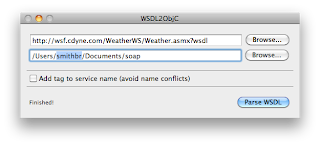
Start WSDL2ObjC. In the first field, enter the name of the source WSDL. You can specify a local file, or a web address. For this demo, enter http://wsf.cdyne.com/WeatherWS/Weather.asmx?wsdl
In the second field, specify a directory on your machine into which WSDL2ObjC will write the new code. When you click "Parse WSDL", you will see a few messages, one of which should say that it is generating Objective C code into the output directory. Check the target directory to make sure your files are there.

2. Create the project in Xcode.
Start Xcode and create a new View-based application. Call it anything you would like. In the .h file for the controller, add an action method called query, and several UITextField outlets for the fields we're going to use: zip, city, conditions, temp, humidity, and wind.

While our app is making the SOAP call, we are going to start up a UIActivityIndicatorView and tell it to spin, and when the call has completed, we're going to stop the spinner. Add another outlet called spinner, and it's of type UIActivityIndicatorView. Your .h file should look something like this:


@interface SoapWeatherViewController : UIViewController <WeatherSoapBindingResponseDelegate>
{
UITextField *zip;
UITextField *city;
UITextField *conditions;
UITextField *temp;
UITextField *humidity;
UITextField *wind;

UIActivityIndicatorView *spinner;

}

@property (nonatomic, retain) IBOutlet UITextField *zip;
@property (nonatomic, retain) IBOutlet UITextField *city;
@property (nonatomic, retain) IBOutlet UITextField *conditions;
@property (nonatomic, retain) IBOutlet UITextField *temp;
@property (nonatomic, retain) IBOutlet UITextField *humidity;
@property (nonatomic, retain) IBOutlet UITextField *wind;

@property (nonatomic, retain) IBOutlet UIActivityIndicatorView *spinner;

-(IBAction)query;

@end


Because we want our class informed when our SOAP call completes, we are going to designate it as being the delegate for the call, so we want it to implement the WeatherSoapBindingResponseDelegate protocol.

Now in the .m file, add lines to @synthesize our IBOutlets, and make sure you dealloc the UITextFields and UIActivityIndicatorView in dealloc.

Let's write the query method. This is the event that will occur when we click the "What's it like" button in the app. Let's just write boilerplate for the moment:

-(void)query { }

3. Build the UI
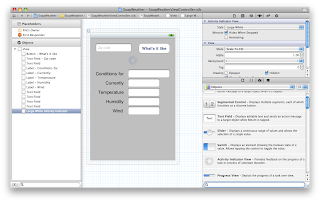
Double-click the XIB file for your controller to load it into Interface Builder. You will want to add a button to the NIB; title it "What's it like?" and wire its Touch Up Inside event to the query action. Add several UITextFields and labels, and connect all the outlets. And finally, add an Activity Indicator View.

It should look something like this when you're finished:

4. Pull in the WSDL2ObjC generated code.
Let's pull in the code WSDL2ObjC wrote for us. In "Other Sources," add a new group named "Weather". With Finder, drag all the files that WSDL2ObjC created into the new group. Tell Xcode to copy the items into the destination folder.

Take a look at Weather.h. There's a ton of stuff in there: definitions for bindings, responses, requests, etc. This code represents the data that WSDL2ObjC pulled out of Weather's WSDL.
Before compiling, we have to do two things to our build target: Double click on the project name to bring up the build settings.
  • In the Other Linker Flags section, add -lxml2 to the Linker Flags.
  • In the Other C Flags section, add -I/usr/include/libxml2

5. Write
Time to write some code. Open the .m for your controller, and #import "Weather.h". Now let's write our query method:

-(void)query
{
[zip resignFirstResponder];

WeatherSoapBinding *binding = [[Weather WeatherSoapBinding] initWithAddress:@"http://wsf.cdyne.com/WeatherWS/Weather.asmx"];
binding.logXMLInOut = YES;

Weather_GetCityWeatherByZIP *parms = [[Weather_GetCityWeatherByZIP alloc] init];
parms.ZIP = self.zip.text;

[binding GetCityWeatherByZIPAsyncUsingParameters:parms delegate:self];

[spinner startAnimating];
[parms release];
}


Zip calls resignFirstResponder so the keyboard will go away. We then create a binding and associate it with our service endpoint. We then create a request, fill in the blanks, then call the service.

The point of an asynchronous call is that we don't have to wait for it to finish. We don't have to halt our user interface, we can carry on with other tasks, etc. But we do have to tell the binding what to do when the call is finished. We give it an object which implements the WeatherSoapBindingResponseDelegate protocol (which conveniently is the controller itself [see the .h file]).

Declaring the controller as something which implements WeatherSoapBindignResponseDelegate means we have to write code for that method. Here it is
#pragma mark -
#pragma mark WeatherSoapBindingResponseDelegate methods
- (void) operation:(WeatherSoapBindingOperation *)operation completedWithResponse:(WeatherSoapBindingResponse *)response
{
[NSThread sleepForTimeInterval:5.0];

// step 1 fill in the blanks.
for (id mine in response.bodyParts)
{
 if ([mine isKindOfClass:[Weather_GetCityWeatherByZIPResponse class]])
 {
     self.city.text = [[mine GetCityWeatherByZIPResult] WeatherStationCity];
     self.conditions.text = [[mine GetCityWeatherByZIPResult] Description];
     self.temp.text = [[mine GetCityWeatherByZIPResult] Temperature];
     self.humidity.text = [[mine GetCityWeatherByZIPResult] RelativeHumidity];
     self.wind.text = [[mine GetCityWeatherByZIPResult] Wind];     
 }
}
// step 2 shut off the activity indicator, because we're done!
[spinner stopAnimating];
}

When the call completes this method is called. We sleep for five seconds (to enjoy watching the spinner), then fill in the blanks with the results of our query. Finally, we stop the activity indicator.

6. Run.
Save everything. Build and run the application. Enter your zip code into the field, then click "What's it like." You should see the spinner start spinning:
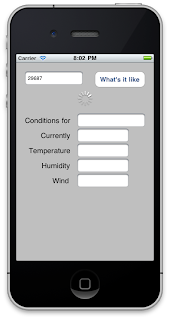
After about five seconds, you should see the weather for that location:
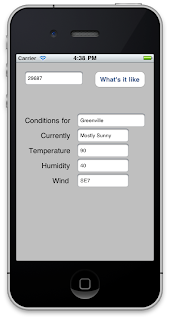
It's about 90, with a gentle breeze at the moment. Great weather for a motorcycle ride!

Hope this has been helpful; let me know what you think.

Monday, April 18, 2011

I appreciate what KBC did for me

Maria models my VR-1
I really like my KBC VR-1 helmet. Very light and comfortable, it was a great purchase from my local bike shop. I never ride without it. A few months ago my left base plate broke, so the visor would tend to fall off if I tried to open it. The bike shop didn't carry replacement plates for that helmet, and although I looked online for a replacement plate, I was unable to find one for that particular helmet. Replacement plates for other helmets ran about ten bucks, so I knew what I could expect to pay when I found one.

So I wrote the company, asking them where I could get a plate. They said I could get one from KBC themselves, and they sent me a set for free. I received the new plates (they sent me one for each side) and now my helmet is as good as new.

Thanks, KBC! I appreciate it very much.

Friday, July 30, 2010

iPhone Development: Accessing SOAP Services with WSDL2ObjC Part II

In my last post we built a basic exerciser for WSDL2ObjC. It's time to talk about complex SOAP data types. What we're going to do today is build a program which uses complex SOAP types. I'll start this tutorial from scratch, so you don't have to go through the first tutorial to get here.

Here's what you need to get started:
  • WSDL2ObjC. I'm going to use WSDL2Objc-0.7-pre1.zip for this tutorial. You can get this from the project's home page.
  • A web service to consume. For this tutorial, we'll use the "Barcode" service (http://www.webservicex.net/genericbarcode.asmx). This service will accept a complex SOAP datatype defining various options to generate a barcode, and will return data which represents the barcode image.

Let's go.

1. Generate the stubs with WSDL2Objc.
Start WSDL2ObjC. In the first field, enter the name of the source WSDL. You can specify a local file, or a web address. For the barcode service, enter http://www.webservicex.net/genericbarcode.asmx?wsdl In the second field, specify a directory into which WSDL2ObjC will create the new files. You can use the Browse button to specify a particular directory. When you click "Parse WSDL," you will see a few messages, one of which should say it is generating Objective C Code into the output directory. Check the target directory to make sure your files are there.
2. Create the project in Xcode.Start Xcode and create a new View-based Application. Call it anything you'd like. In the .h file for the controller, add an action method called buttonPressed, and then two outlets called dataToEncode and barcodeImage.

... UIViewController {
UITextField *dataToEncode;
UIImageView *barcodeImage;
}

@property (nonatomic, retain) IBOutlet UITextField *dataToEncode;
@property (nonatomic, retain) IBOutlet UIImageView *barcodeImage;

-(IBAction)buttonPressed:(id)sender;


In the .m, add the lines to @synthesize dataToEncode and barcodeData, then add the boilerplate for buttonpressed:

-(IBAction)buttonPressed:(id)sender
{
}


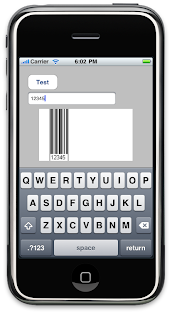
Save these files, then open the controller's NIB with Interface Builder. Place a text field and a button on the View. Call the button "Test" or whatever you want, place the field anywhere you want, and add "Data to encode" as a placeholder, if you want. Add a UIImageView. Mine looks like this:

Now hook the button's Touch Up Inside event to the buttonPressed action, and connect the dataToEncode outlet to the UITextField, and connect the barcodeImage outlet to the UIImageView. Save the file and close Interface Builder.

Go ahead and build and run, just to make sure everything's OK so far. I expect everything to be OK, but it doesn't hurt to check.

3. Pull in the WSLD2ObjC generated code.
Let's pull in the code WSDL2ObjC wrote for us: in the project add a new Group named "BarCode SOAP classes". With Finder, drag all the files that it created into the new group. Tell Xcode to copy the items into the destination folder.

Take a look at Barcode.h. There's a ton of stuff here: definitions for bindings, responses, requests, etc. This code corresponds to the data that WSDL2ObjC pulled out of BarCode's WSDL.

Before compiling from this point we have to do two things to our build target: open the Targets group, right-click your target, then select "Get Info," and then "Build." Do the following:

  • In the Linking section, find "Other Linker Flags." Add the -lxml2 to the Linker Flags.
  • In the GCC 4.2 - Code Generation section, find "Other C Flags." Add -I/usr/include/libxml2 to Other C Flags.

4. Write.
Let's write some code. Open the .m for your controller. #import "Barcode.h". Now let's write our buttonPressed method:


- (IBAction)buttonPressed:(id)sender
{
  BarCodeSoapBinding *binding = [[BarCode BarCodeSoapBinding] initWithAddress:@"http://www.webservicex.net/genericbarcode.asmx"];
  binding.logXMLInOut = YES;

  BarCode_BarCodeData *params = [[BarCode_BarCodeData alloc] init];
  params.Height = [NSNumber numberWithInt:125];
  params.Width = [NSNumber numberWithInt:225];
  params.Angle = [NSNumber numberWithInt:0];
  params.Ratio = [NSNumber numberWithInt:5];
  params.Module = [NSNumber numberWithInt:0];
  params.Left = [NSNumber numberWithInt:25];
  params.Top = [NSNumber numberWithInt:0];   params.CheckSum = NO;   params.FontName = @"Arial";   params.BarColor = @"Black";   params.BGColor = @"White";   params.FontSize = [NSNumber numberWithFloat:10.0];   params.barcodeOption = BarCode_BarcodeOption_Both;   params.barcodeType = BarCode_BarcodeType_Code_2_5_interleaved;   params.checkSumMethod = BarCode_CheckSumMethod_None;   params.showTextPosition = BarCode_ShowTextPosition_BottomCenter;   params.BarCodeImageFormat = BarCode_ImageFormats_PNG;
   BarCode_GenerateBarCode *request = [[BarCode_GenerateBarCode alloc] init];   request.BarCodeText = [dataToEncode text];   request.BarCodeParam = params;
   BarCodeSoapBindingResponse *resp = [binding GenerateBarCodeUsingParameters:request];   for (id mine in resp.bodyParts)   {      if ([mine isKindOfClass:[BarCode_GenerateBarCodeResponse class]])      {         UIImage *barcode = [UIImage imageWithData:[mine GenerateBarCodeResult]];
         [barcodeImage setImage:barcode];      }   }
   [request release];   [params release];
}

We create a binding, then associate it with the Barcode Generator service endpoint. We then create a request, fill in the blanks, then call the service. The service returns a BarCodeSoapBindingResponse which we save in resp.

Now about that request. If you look at the definition of BarCode_GenerateBarCode you'll see it has two parts: BarCodeText, a NSString representing the data to encode, and BarCodeParam, which is an object representing a set of parameters affecting the barcode I'm going to get. BarCodeParam covers things like dimensions of the image, the barcode symbology to use, etc. You can see how I set the parameters. Now how did I know what to set each to? In the WSDL definition you can see each element and its type, so I know which parameters need a number, which need a string, and so forth. If you look in Barcode.h that WSDL2ObjC generated, you will also find enum values for options like which barcode symbology to use, image format to return, etc.

The response type has a field called bodyParts. The code runs through bodyParts, looking for the response to the call. It then builds a UIImage based on the PNG data I asked for, and sets barcodeImage's data to that.

5. Run.
Save everything. Under the Run menu, bring up the console, then build and run. Enter data into the field, then click the "Test" button. In the console, you should see the outbound request, and then the response. And in the simulator, of course, you should see your barcode.


And that's all there is to it. Next time, we'll talk about asynchronous calls.

As always, let me know what you think.